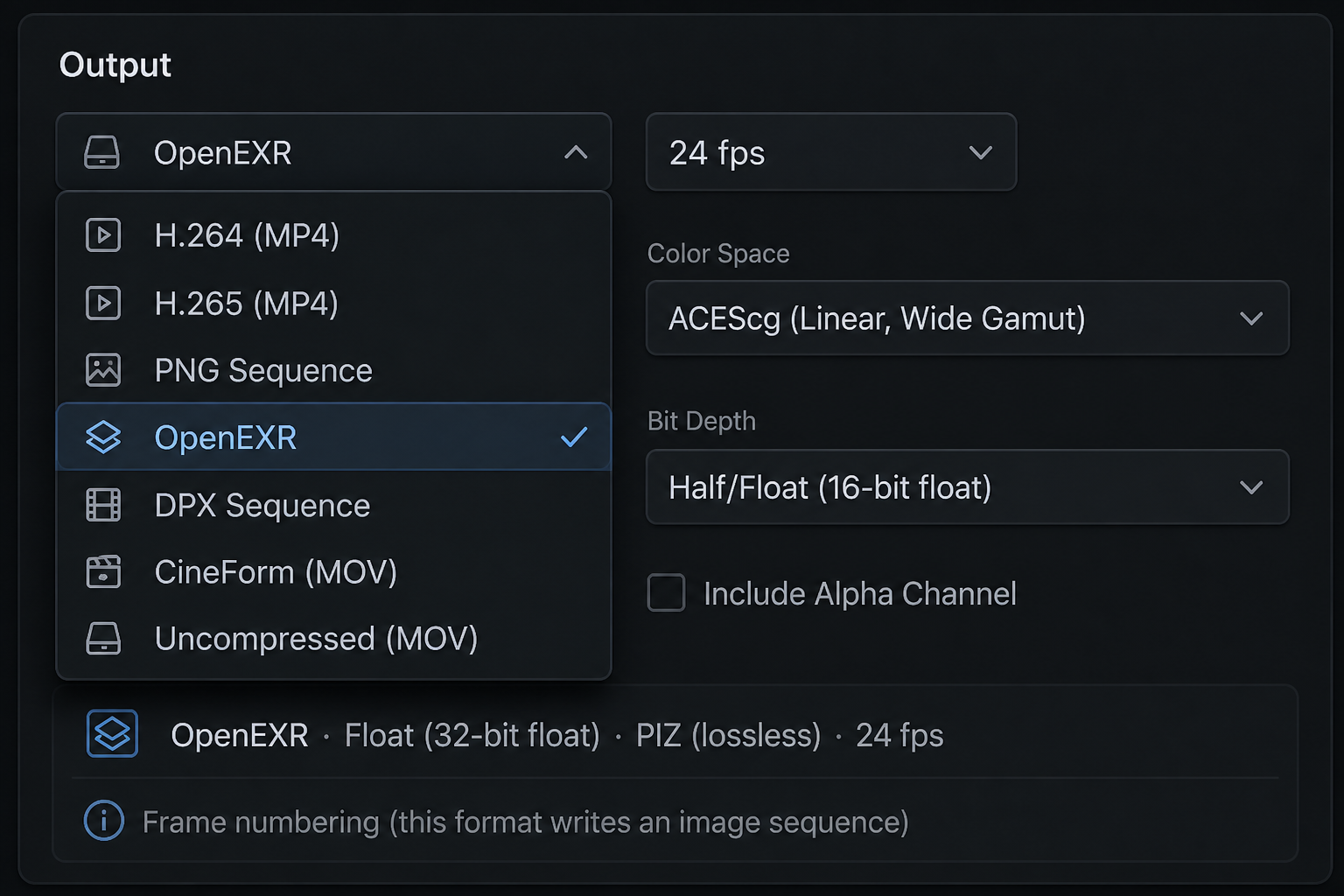
What comes in, what goes out, and — for every delivery format — whether the file is Log, Linear, or Display, and at what bit depth. Tables below are the catalog; this page explains how to read them.
Transduce finishes in scene-linear ACEScg (see ACES Ready), then encodes once into the container your pipeline expects. The tables on this page are not a feature laundry list — they answer pipeline questions in order: what we read, what we write by default, and the full mode-by-mode handoff when you need more than the default.
On every export row, two columns come first. Encoding is one of three honest answers — Log (e.g. DPX Cineon), Linear (scene-linear EXR / linear modes), or Display (Rec.709 / sRGB review). Bit depth is what the file actually stores. Everything else — colour space labels, compression, profiles — sits beside those answers, not instead of them.
Start here for ingest. This list is the set of containers Transduce opens today — stills, video, DPX, and OpenEXR. Source colour is detected (or overridden), then linearized into ACEScg before grade or effects. The row is deliberately short: import is about getting footage in cleanly, not about delivery knobs.
| Reads |
|---|
| OpenEXR · DPX · PNG / TIFF / JPEG · MP4 / MOV / AVI / MKV / WebM / MXF |
Use this table when you only need the defaults. Each shipping format shows Encoding and Bit depth first, then the default colour space. Notes like “also Linear mode” mean a second Encoding choice exists in the Output panel — details unfold in the matrix below. Mastering formats (EXR, DPX, CineForm, Uncompressed) are for grade and house handoff; H.264, H.265, and PNG are display-referred for review and publish.
| Format | Encoding | Bit depth | Default space |
|---|---|---|---|
| OpenEXR | Linear | 16-bit half | ACEScg |
| DPX | Log | 10-bit | Cineon (also Linear mode) |
| CineForm | Display | 10-bit | Rec.709 (also Linear · sRGB; 12-bit on 444) |
| Uncompressed | Display | 10-bit | Rec.709 (also Linear mode) |
| H.264 | Display | 8-bit | Rec.709 |
| H.265 | Display | 10-bit | Rec.709 |
| PNG | Display | 8-bit | sRGB |
Read this when defaults are not enough. Formats that offer more than one mode (OpenEXR spaces, DPX Log vs Linear, Uncompressed Display vs Linear) expand into separate rows — each row still answers Encoding and Bit depth, then names the exact space or curve and the other delivery knobs (compression, chroma layout, quality, alpha). This is the Output panel written as a table.
| Format | Mode | Encoding | Bit depth | Space / curve | Other knobs |
|---|---|---|---|---|---|
| OpenEXR | ACEScg default | Linear | 16-bit half or 32 float | AP1 scene-linear | ZIP / PIZ / DWAA… · Alpha |
| Linear Rec.709 | Linear | 16 / 32-bit float | Scene-linear Rec.709 | ||
| ACES 2065-1 | Linear | 16 / 32-bit float | AP0 interchange | ||
| DPX | Cineon log default | Log | 10-bit or 12 / 16 | Printing density / AP0 | Matte sequence |
| Scene Linear | Linear | 10 / 12 / 16-bit | ACES 2065-1 linear | ||
| CineForm | Rec.709 default | Display | 10-bit 422 default · 12-bit on 444 | BT.709 OETF | 422 / 444 / 444 Alpha · quality film3+…low |
| sRGB | Display | 10 / 12-bit | sRGB OETF | ||
| Scene Linear | Linear | 10 / 12-bit | ACEScg scene-linear in MOV | ||
| Uncompressed | Rec.709 default | Display | 10-bit | BT.709 OETF | 422 / 444 · Alpha = 8-bit only |
| sRGB | Display | 10-bit | sRGB OETF | ||
| Scene Linear | Linear | 10-bit | ACEScg in MOV | ||
| H.264 | Rec.709 | Display | 8-bit | Fixed | Quality ladder |
| H.265 | Rec.709 | Display | 10-bit | Main10 | No HDR10 UI |
| PNG | sRGB | Display | 8-bit or 16 | Fixed | Alpha |
| WebM · AV1 · JPEG Opt-in | Varies | Display | 8-bit typical | Off by default | Module Manager |
The matrix above is the shipping built-in / Standard Out surface. ProRes is not a shipping export; it may appear later only if licensed. DNxHR is not offered. CineForm (MOV) ships in Standard Out. Opt-in rows (WebM, AV1, JPEG) install from the Module Hub when you need them.
Knowing the format catalog is only half the job. Transduce includes a format analysis engine exclusive to this application: point it at a sample delivery file from your production house or finish suite, and it analyzes that reference to align your export — container, encoding path, geometry, and colour targets — then builds a custom project preset (delivery profile) you reuse for the entire project.
Every clip in the batch inherits that preset so the night’s renders aim at the same gate — not a sticky note of settings beside the monitor. Deep dive: Delivery Profile & Analyzer.
The catalogs above are not a hard ceiling. Transduce does not bake codecs into a closed list — decode and encode load as modules. Need another delivery format for a house that the built-ins do not cover? Add it through the Module Hub (Module Manager) without waiting for an app rewrite.
The module system is open. Authors package encoder and decoder capabilities as .a2fmod files; users and facilities can create and share additional format modules for the containers and encodings their pipelines require. Built-in, authorized, and community tiers keep trust clear while the format surface grows. Deep dive: Extensible Platform & Modules.
Transduce bridges the gap between AI and cinema. Your vision. Your pipeline. Perfectly matched.